Works alongside
Plus Shopify. No migration, no checkout changes.
Recharge’s Failed Payment Recovery retries on its own clock and sends transactional emails. MaxLTV runs the whole recovery on top of Recharge as one integrated system: decline-aware retries, personalized email and SMS, the storefront prompt, subscriber-level churn prediction and reporting your finance team can audit. Recharge keeps managing the subscriptions.
Works alongside

Plus Shopify. No migration, no checkout changes.
When a Recharge subscription charge fails, the order enters your Failed Payment Recovery strategy. Recharge retries the charge on rules it sets from the error type and its aggregate history across merchants, and sends a preset series of transactional emails that increase in severity as the order moves through the strategy. Charges that fail with a hard-decline code do not enter the strategy and are handled by the separate Card Declined email. If every retry fails, the associated subscriptions are cancelled with the reason “Failed Payment flow max retries.”
The native behaviour, as documented by Recharge. Worth knowing exactly, because it is the floor you are building on.
Recharge sets the retry timing from rules keyed to the payment error type and its history across merchants. There are no retry intervals for you to configure, and no per-subscriber decision about when that card is most likely to clear.
Each strategy ships with preset transactional notifications that increase in severity as the order progresses. You can edit the copy, translate it, add a logo and A/B test the messages. Marketing content is not allowed in them.
Charges that fail with a hard-decline error code do not enter the recovery strategy. Recharge notifies those customers through its separate Card Declined email setting.
If all retry attempts fail, the associated subscriptions are cancelled automatically with the reason “Failed Payment flow max retries.” Recovery rate and recovered revenue are reported on the strategy’s Performance tab in monthly cohorts.
None of this is a flaw in Recharge. Retry logic and scheduled notifications are billing features. Recovery is also a customer-behaviour problem, and even the retry itself works better when it is placed per decline, which needs a different set of tools.
Recharge keeps managing the subscriptions. MaxLTV takes over recovery: the retries and every message around them, in one system.
A subscriber with an open failure sees a banner or notification the moment they land on your store, which is where many of them go instead of reading email.
Email and SMS split by failure reason and triggered by what the subscriber does, not only by the retry schedule. Sent from your own verified domain, with an exit check before every send so a recovered customer never gets another reminder.
Every message and prompt links straight to a secure payment-update flow. No password reset, no account page, no hunting for the subscription.
Every decline is classified and the retry placed when that card is most likely to authorize, with backup payment methods on file tried when the primary card is dead. Hard declines, including expired cards and emptied Shop Pay wallets, go straight to the card-update path because no retry will clear them.
Churn risk scored per subscriber daily, so intervention can start before the first failure, and recovery rate reported the way finance can audit it: retries alone versus card updates, by failure reason and by cohort.
MaxLTV is a managed engagement. The sequences, prompts and thresholds are set up and tuned by people who do this for subscription brands, not left as a template.
| Recovery lever | Recharge alone | With MaxLTV |
|---|---|---|
| Retry timing | Rules-based | AI-driven: each retry placed by decline code for when the card is most likely to authorize, with backup payment methods on file and reduced-amount retries after repeated declines |
| Card update incentives | None | Incentives for updating the card, coordinated with the emails and the retry schedule |
| Customer messaging | Preset transactional emails, escalating by stage | Personalized email and SMS split by failure reason, with exit checks before every send |
| Trigger for messaging | Retry ladder stage | Adds behaviour triggers: store visit, email engagement, risk score |
| On-site prompt for an open failure | None | Banner or notification on the next visit |
| Churn prediction before the failure | Not part of Failed Payment Recovery | Per-subscriber risk score, daily |
| Recovery reporting | Recovery rate and revenue, monthly cohorts | Adds the split: retries alone vs card updates, by reason and cohort |
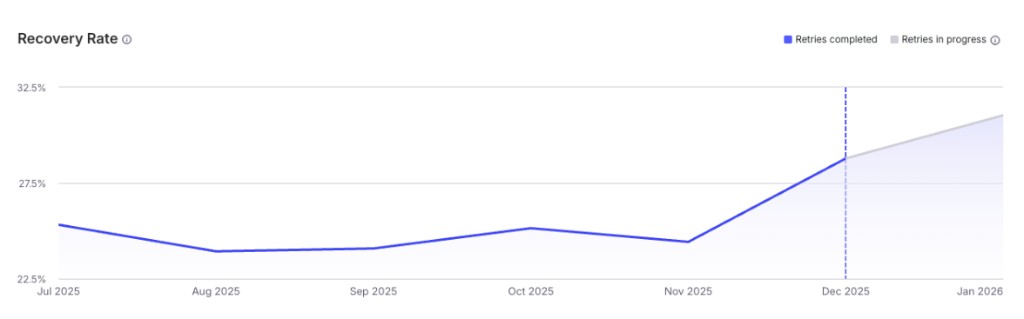
Bonafide moved its dunning to MaxLTV in December 2025. Recovery more than doubled, from about 24% of failed payments to roughly 55%, for a $2M annual LTV impact. The levers are the same on Recharge.
A managed rollout, in stages, with no migration off Recharge and no checkout changes.
We start with your Recharge failure data: which reasons fail, what recovers on retries, what needs a card update, and what that is worth.
MaxLTV installs as a Shopify app and connects to your Recharge store. Subscriptions, products and checkout stay in Recharge.
Failure reasons map to retry rules, sequences and prompts. MaxLTV takes over from Recharge’s Failed Payment Recovery, so a failed charge is only ever retried and messaged by one system.
Flows go live in stages and recovery is reported split by retries versus card updates, so you can see what changed against Recharge’s native recovery.
For recovery, yes. MaxLTV takes over retry timing and subscriber messaging as one integrated system: decline-aware retries, personalized email and SMS, the storefront prompt for subscribers with an open failure, per-subscriber churn prediction and recovery reporting split by retries versus card updates. Recharge keeps managing the subscriptions themselves.
No. That guidance exists so two systems never retry or message the same failed charge. MaxLTV handles both the retries and the messaging, so it runs in place of Recharge’s recovery strategy rather than alongside it. We set up the handover during implementation.
Yes. MaxLTV works from Shopify customer, order and payment-method data, which is what the Shopify Checkout Integration runs on. If your store is still on a migrated checkout, tell us in the audit and we will confirm what applies.
Recharge acquired Skio on 30 April 2026 and both platforms continue to operate. MaxLTV runs alongside either, so recovery put in place now carries through a migration if you make one. See the Skio page for that platform’s specifics.
Two models: a managed engagement, or a performance partnership priced on recovered revenue. Pricing has the details, and the free churn audit shows what recovery is worth on your numbers before you commit.
Bring your Recharge failed-payment export to the free churn audit. We will show you which failures are recoverable, what they are worth, and what to fix first.
Background reading: dunning best practices, recovery rate and decline codes and the payment recovery overview. Also for Skio and Stay.ai.